What in the world is a "UX designer"? A guide for students
Frances Chan
This piece was reviewed by a senior UX designer who's worked for leading companies like AT&T, Johnson & Johnson, and more.
🤔 But first, what's "UX"?
🔍 What do UX designers do?
❓ Why do UX designers exist?
💡 What products do UX designers work on?
🆚 What's the difference between UX, UI, and graphic designers?
🔄 Other related roles
2. Where can I find internships?
Part 1. What's a UX designer?
🤔 But first, what's "UX"?
UX stands for "User Experience" and it's all about making products easy for people to use. The term usually applies to digital products like apps and websites, but let's use the example of a physical product to better understand it: a flashlight.
Let's say there are two flashlights: a basic one and a well-designed one. The basic flashlight turns on and off, and that’s pretty much it. The well-designed flashlight:
- Has a textured grip that makes it easy to hold securely, even in rainy weather.
- Has a switch that's large and glows in the dark, so you can easily turn it on without fumbling.
- Is energy-efficient, so you don’t have to change batteries too often.
In other words, it's not just a tool for seeing in the dark! Every aspect of its use—from how it feels in your hand to how it functions in different situations—has been considered to enhance your overall experience.
This focus on making everything about the experience better is what good UX aims at.
🔍 What do UX designers do?
A UX designer is someone who designs and enhances the user experience of products and services.
Their job is to make sure that when someone uses a product—whether it's a website, an app, or any other user interface—it's not only functional but also easy, enjoyable, and efficient to use.
They do this by thinking about how users would use a digital product and then designing that product around users' needs.
Here’s how.
-
Research: UX designers start by understanding the users' needs, behaviors, and motivations through research. This might involve observing users, conducting interviews, or gathering feedback to get a clear picture of what users want and need.
-
Design: Based on their research, they design the product. They create wireframes, prototypes, and designs, focusing on how the product feels and how easy it is for users to achieve their goals.
-
Testing: UX designers test their designs with real users to see what works and what doesn’t (e.g. a user might get stuck somewhere in an app because the design is confusing).
-
Iteration: They use the insights gained from user testing to refine and tweak designs.
-
Implementation: UX designers often work closely with developers and other team members to bring their designs to life, ensuring that the final product remains true to their user-centered vision.
In essence, UX designers think about how everything fits together from the user's perspective, making sure that every touchpoint is thoughtful and coherent.
❓ Why do UX designers exist?
Just as a construction firm could build a house without an architect, it's also possible for developers to create digital products without a UX designer. Why do UX designers exist then?
#1 There's a lot of competition in tech these days.
Back when computer software was new, there weren’t many options available. Developers didn't have to worry too much about making their tools super easy to use because there wasn't another choice around the corner. People had to use whatever was available, even if it was a bit complicated.
Nowadays, there are so many new tech products coming out every day. Companies need designers to make their products look nice so customers will choose their products over other ones.
Another advantage to hiring a UX designer is that they stay up-to-date on emerging technologies and trends. This enables them to make your product relevant and apply new techniques to enhancing the experience for your users.
– UX designer, formerly @ AT&T and Johnson & Johnson
#2 More people than ever are using tech products.
In the early days, software was primarily used by the tech-savvy: enthusiasts and tech professionals. They were okay with tough interfaces because they were used to it. As the average Joe (and his parents and grandparents!) began relying on technology, it became important to make software that everyone could use easily.
#3 Good design boosts business.
Last but not least, businesses that hire UX designers know that it helps their bottom line. Good UX design isn't just about making users happy—it also serves the needs of a business.
Take a shopping app for instance. If the checkout process is simple and quick, users are more likely to complete their purchases without abandoning their carts. This has a direct impact on the company's profits.
Besides boosting engagement and conversions, products that prioritize user experience tend to result in higher customer satisfaction and loyalty, which leads to more business in the long run.
– UX designer, formerly @ AT&T and Johnson & Johnson
In a gist, UX design roles tend to exist when:
- A software product is made to be used by the general public (as opposed to software used by a small number of people).
- In competitive fields where design really impacts a business' bottomline.
So if a software application is made to be used by a very small number of people (say, an internal tool that a start-up's employees use), it wouldn't need a UX designer. Neither would an app that's in a space that's not super competitive. These tools don't need to look or feel great; they just need to work.
💡 What products do UX designers work on?
Here's a taste of typical things a UX designer might work on.
-
Digital products
- Websites and mobile apps like Tiktok and Instagram.
- Software applications like Microsoft Word and Canva.
- E-commerce platforms like Amazon. UX designers make sure it's easy for you to browse products, add items to cart, and complete purchases.
-
Consumer electronics
- Smartphones and tablets: UX designers help make sure that the things you do on your devices, like swiping and tapping, feel natural. They also ensure these devices meet the needs of different users.
- Wearable technology: For gadgets like smartwatches and fitness trackers, UX designers work on making sure you can read and use them easily, even though they have such small screens.
-
Services
- Banking services: Online banking, mobile apps, and even ATM interfaces are designed with UX in mind.
- Healthcare services: In healthcare, good UX helps make apps and systems clear and simple, helping you book your doctor visits or check health info without hassle.
-
Physical products
- Home appliances: Many modern appliances come with screens and buttons that UX designers help make user-friendly.
- Automobiles: As cars include more digital features, like touchscreens, UX designers are key in making sure these are safe and easy to use while driving.
Here are some cool things I've heard other UX designers working on:
- Interactive kiosks: UX designers create interactive kiosk interfaces for public spaces such as museums, retail stores, and transportation hubs, facilitating self-service interactions for users.
- Gaming interfaces: UX designers design user interfaces for video games, focusing on gameplay elements, menus, and controls to provide immersive and engaging gaming experiences.
- Clinical decision support tools: UX designers create user interfaces for clinical decision support tools, such as iCVA (integrated cerebrovascular assessment) applications, designed specifically for doctors to use on their iPads. These interfaces provide easy access to patient data, medical images, diagnostic tools, and treatment guidelines, enabling doctors to make informed decisions quickly and efficiently during patient consultations and assessments. Close attention to usability and workflow optimization is crucial in ensuring that these tools seamlessly integrate into doctors' daily routines and enhance patient care.
– UX designer, formerly @ AT&T and Johnson & Johnson
🆚 What's the difference between UX, UI, and graphic designers?
Whereas UX designers focus on making an experience seamless for users, UI (User Interface) designers focus on making a product visually appealing. UI design work can include everything from choosing colors and fonts to determining how a website or an app's buttons look.
Some companies have separate UX and UI designers. In this case, both the UX and UI designers would make wireframes, which are like "drafts" of what the final product would look like. However, the UX designer would make a "low-fidelity wireframe" (this can be as simple as a sketch on paper) and then hand it off to the UI designer, who would then flesh out the design and make, say, a high-fidelity wireframe, with colors and branding and all.
– UX designer, formerly @ AT&T and Johnson & Johnson
To get a clearer idea, check out the following visual from Protopie (a prototyping tool that product designers use). On the left is a black and white layout of an app – this is what UX designers would make. On the right is what UI designers would be responsible for making.
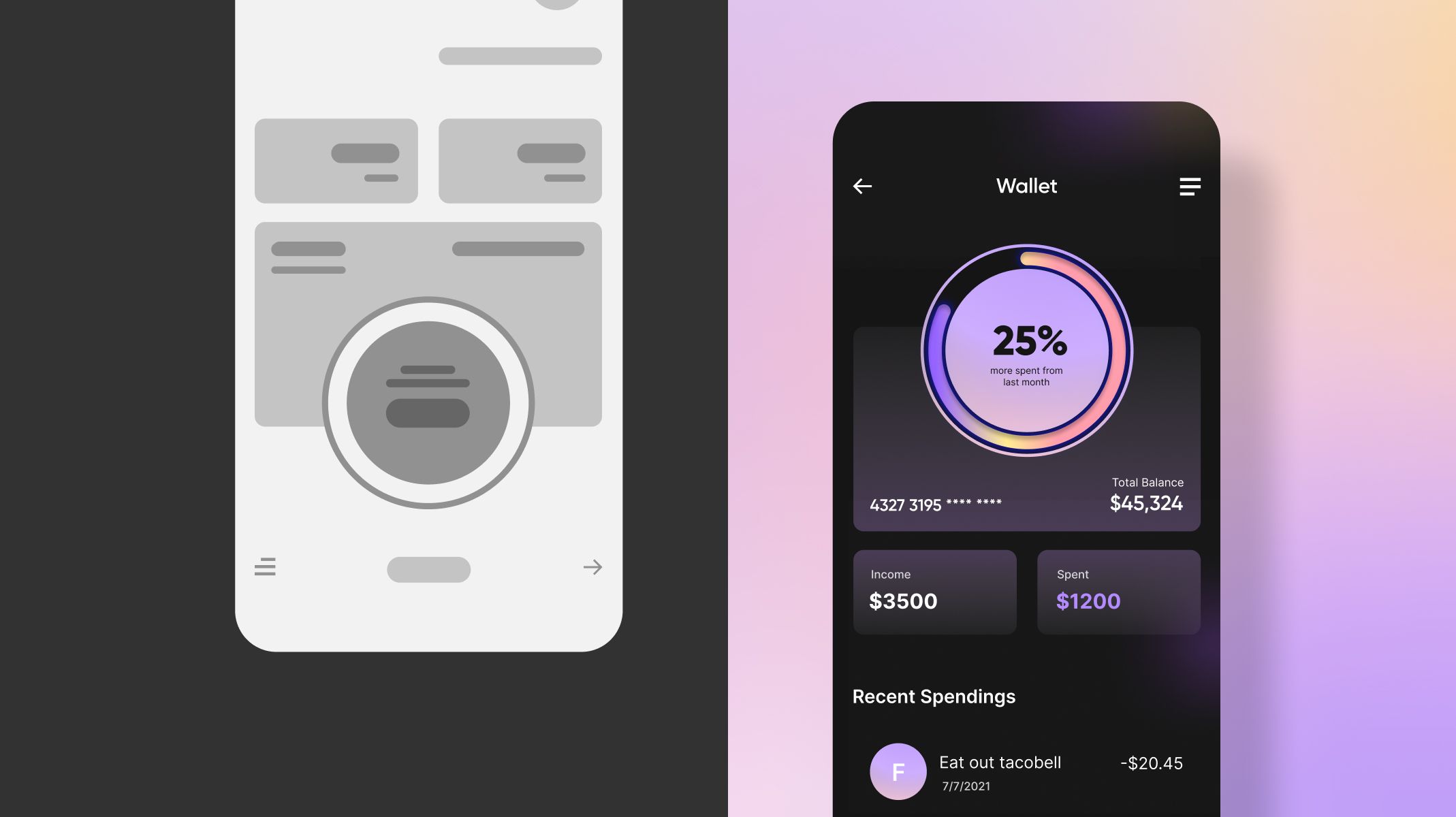
Together, UX and UI designers are also known as "product designers." Unlike product designers, graphic designers tend to sit in marketing, branding, or advertising teams. They might design logos or advertisements for websites and social media.
I've worked at agencies where some clients may not have any type of brand representation (no logos, social media, flyers). So the agency will also have a graphic designer or art director to establish the client's brand.
I've also done that myself in my own agency. I can build out their logo and their brand colors and once we have that all good to go, then I can start applying branding to the product that I build out for them.
– UX designer, formerly @ AT&T and Johnson & Johnson
🔄 Other roles you might be interested in
Being a UX designer, you'll work closely with product managers and front-end developers.
- Product managers oversee the development of a product and align product features with user needs and business goals. Learn more in What in the world is a product manager?
- Frontend developers turn design ideas into real user interfaces. They use languages like HTML, CSS, and JavaScript to create the visual and interactive parts of a product. They make sure the design looks right and works well on different devices and browsers.
There are also other roles within the product design space. Here are some I've worked with or heard of:
- UX researcher: Focuses solely on understanding the behaviors and needs of users. They conduct studies, perform tests, and gather data to build user personas and inform the design process. UX researchers do not typically design wireframes; instead, they provide the critical data that informs design decisions.
Usability analyst: Evaluates the usability of products through usability testing, heuristic evaluations, and user feedback, identifying areas for improvement to enhance the overall user experience.
QA assessor: Collaborates closely with UX/UI designers to assess the quality of the user experience through rigorous testing processes. They ensure that products meet design specifications, identify defects or inconsistencies, and provide feedback to improve usability and functionality. QA assessors play a crucial role in maintaining the integrity of the user experience throughout the development lifecycle.
– UX designer, formerly @ AT&T and Johnson & Johnson
Part 2. Where can I find internships?
You can find plenty of internships on Prosple. We have a vast selection of internships curated for students like you. Just filter 'til you find the right fit!